
Generate Single Image
The synchronous generation endpoint generates one image per API call and returns the result immediately in the response body. Use this when you need a single asset on demand and can wait for the response (typically well under a second; hard-capped at 10 s).
For bulk generation across multiple formats, use the asynchronous endpoint instead.
Endpoint
Generation characteristics
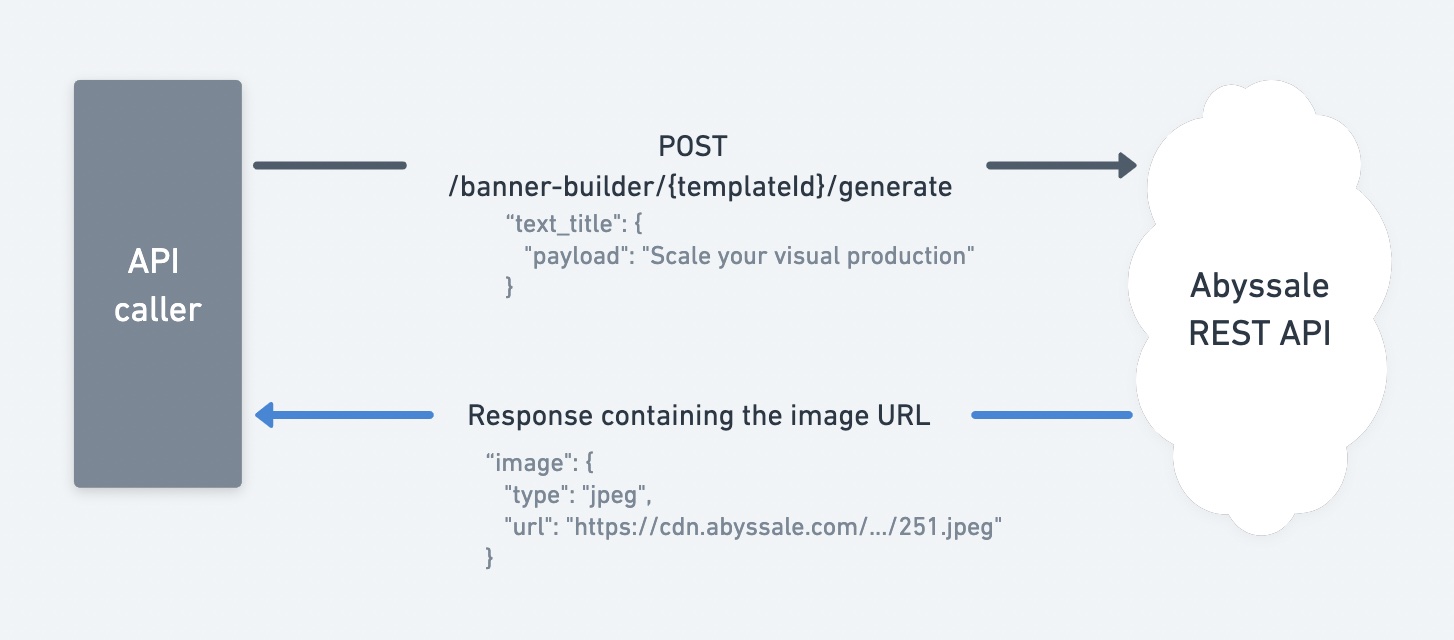
- Supported Design Type: Static
- Response: Synchronous
- Generates a single asset based on provided customization parameters
Bounded at 10 seconds
The rendering budget is hard-capped at 10 s: the call either returns the finished file within that window or fails with 500 internal_server_error. Typical renders take tens of milliseconds — only heavy source images with slow transformations approach the cap. If a design keeps hitting it, generate it asynchronously instead.
AI features on this endpoint
The 10-second cap decides which AI features belong here.
text_to_image— not accepted. An AI generation takes far longer than the budget, so it is not part of this endpoint's contract; sending it answers400 invalid_payload. Generate asynchronously instead.remove_bg— deprecated here. It works and existing integrations keep working, but it adds an AI round-trip before the render, so a large or slow source image can push the call past the cap and return500 internal_server_errorinstead of your asset. Remove backgrounds asynchronously.auto_focus— fully supported, no caveat. It runs on Abyssale's own detection model and is fast enough that it does not put the budget at risk.
Output file types
Supported formats: JPEG, PNG, WEBP, AVIF, Web PDF
Override the default with the image_file_type parameter: png, jpeg, webp, avif, or pdf (auto is also accepted and behaves exactly like omitting the field). pdf (Web PDF) is plan-dependent — a plan without it answers 429 with "Web PDF is not included in your plan".
File type determination
By default, file type is selected automatically based on background transparency:
- Transparent background → PNG
- Opaque background → JPEG
JPEG has no transparency
When generating a JPEG with transparent elements, those areas will be filled with black. JPEG does not support transparency.
Sample request
Replace {YOUR-API-KEY} and {designId} before running.
curl -X POST \
  -H "x-api-key: {YOUR-API-KEY}" \
  -H "Content-Type: application/json" \
  -d '{
    "template_format_name": "main-crisp",
    "elements": {
      "image": {
        "image_url": "https://mycompany.com/image.jpeg",
        "fitting_type": "cover",
        "alignment": "middle center"
      },
      "text_title": {
        "payload": "Send best wishes to your lovelies with little easter gifts!",
        "color": "#FFFFFF",
        "font_size": 48,
        "font_weight": 700,
        "line_height": 120,
        "alignment": "top left"
      }
    }
  }' \
https://api.abyssale.com/banner-builder/{designId}/generateimport abyssale from '@abyssale/sdk';
// Set ABYSSALE_API_KEY env var before running
const { data, error } = await abyssale.generateImage('{designId}', {
template_format_name: "main-crisp",
elements: {
image: {
image_url: "https://mycompany.com/image.jpeg",
fitting_type: "cover",
alignment: "middle center"
},
text_title: {
payload: "Send best wishes to your lovelies with little easter gifts!",
color: "#FFFFFF",
font_size: 48,
font_weight: 700,
line_height: 120,
alignment: "top left"
}
}
});
if (error) console.error(error);
else console.log(data.file.cdn_url);from abyssale import Abyssale
# Set ABYSSALE_API_KEY env var before running
with Abyssale() as client:
banner = client.generate_image("{designId}", {
"template_format_name": "main-crisp",
"elements": {
"image": {
"image_url": "https://mycompany.com/image.jpeg",
"fitting_type": "cover",
"alignment": "middle center",
},
"text_title": {
"payload": "Send best wishes to your lovelies with little easter gifts!",
"color": "#FFFFFF",
"font_size": 48,
"font_weight": 700,
"line_height": 120,
"alignment": "top left",
},
},
})
print(banner.file.cdn_url)API Reference
Path parameters
| Parameter | Type | Required | Description |
|---|---|---|---|
designId | string (uuid) | Yes | Unique identifier of the design to generate from. |
Request body
| Field | Type | Required | Description |
|---|---|---|---|
elements | object | No | Element overrides keyed by layer name. Every value must be an object ({"title": {"payload": "Hi"}} — a bare string value answers 400 invalid_payload; this strictness is synchronous-only). See Element Properties. Omit to render the design's saved default content. |
template_format_name | string | No | Format ID to generate (e.g. "facebook-post"). When omitted, the design's first format is generated. |
image_file_type | string | No | Output file type: "png", "jpeg", "webp", "avif", "pdf" ("auto" ≡ omitted). When omitted: jpeg, or png when the format's background color is transparent. |
file_compression_level | integer | No | Output quality, 1–100 — 100 is the best quality (least compression), 1 the smallest file. Despite the name, higher = better. |
original_visual_id | string (uuid) | No | Regenerate an existing visual in place, keeping its share URL — see Visual Versioning. An unknown or unrelated visual answers 404 (visual_not_found, not_related_to_same_template or not_related_to_same_format). |
Sample response
{
  "id": "5978e8d9-ab34-4735-a2cb-fe95c2c56251",
  "version": 1,
  "sharing_id": "5fcec999-2bfb-4dd7-ba38-2d9e16c49149",
  "file": {
    "type": "jpeg",
    "url": "https://production-banners.s3.eu-west-1.amazonaws.com/e0d292f2-ec21-11e9-a539-3c408bf94155/996739f4-b563-428a-a6e8-dd3cb8bd03d4.jpeg",
    "cdn_url": "https://cdn.abyssale.com/e0d292f2-ec21-11e9-a539-3c408bf94155/996739f4-b563-428a-a6e8-dd3cb8bd03d4.jpeg",
    "filename": "996739f4-b563-428a-a6e8-dd3cb8bd03d4.jpeg"
  },
  "format": {
    "id": "facebook-feed",
    "width": 1200,
    "height": 628,
    "unit": "px"
  },
  "template": {
    "id": "46d22c62-d134-44d3-a040-138e4ea9ea08",
    "name": "Summer campaign — FB feed",
    "created_at": 1749827107,
    "updated_at": 1749827107
  },
  "image": {
    "type": "jpeg",
    "url": "https://production-banners.s3.eu-west-1.amazonaws.com/e0d292f2-ec21-11e9-a539-3c408bf94155/996739f4-b563-428a-a6e8-dd3cb8bd03d4.jpeg"
  }
}
Response fields
| Field | Always | Description |
|---|---|---|
id | ✓ | The generated visual's UUID. |
version | ✓ | Visual version — increments when regenerated via original_visual_id. |
sharing_id | ✓ | Stable sharing identifier — survives re-versioning. |
file | ✓ | {type, url, cdn_url, filename}. For HTML5 output (async only) type is zip, cdn_url is absent and a fallback_image_url (backup JPEG) is added. |
format | ✓ | {id, width, height, unit} — unit is px, or mm/in on print designs. |
template | ✓ | The design's {id, name, created_at, updated_at}. |
project | when the design has one | {id, name, created_at_ts}. |
image | ✓ | Deprecated — same as file.type/file.url; kept for existing clients. |
edit_url / view_url | conditional | Platform URLs, present only for visuals bookmarked or downloaded in the platform — API-generated visuals usually don't carry them. |
visual_status | conditional | {status, status_updated_at_ts, reason?, content_to_replace?, content_to_hide?} when the visual carries a review status. The last two carry reviewer feedback — content asked to be replaced or hidden. |
Errors
| Status | id | When |
|---|---|---|
400 | invalid_payload | Validation failure — flat errors: [{path, code, message}] array. |
400 | template_not_static | The design is animated/printer/printer_multipage — use the async endpoint. |
400 | cannot_build_banner | The render engine rejected an element (e.g. text cannot fit), and the fallback id for any other engine rejection — every error carries an id. See Errors. |
401 | api_access_denied | Your plan does not include API access. |
404 | template_not_found | Unknown design UUID (or a design belonging to another workspace). |
404 | visual_not_found / not_related_to_same_template / not_related_to_same_format | Bad original_visual_id. |
429 | rate_limit_exceeded | Out of credits, the global 10 req/s ceiling, or a plan restriction (e.g. Web PDF). |
429 | request_rate_limited | Too many requests for this endpoint's tier. Never the same id as the case above. |
500 | internal_server_error | Generation failed or exceeded the 10 s budget. |
Related
- Element Properties — every overridable property per layer type
- Visual Versioning — regenerate under the same share URL
- Asynchronous Generation — batches, video/GIF/HTML5/print
- Errors — the full error catalogue
- Node.js SDK · Python SDK — every method, config, retries and the polling helpers