
Asset Export
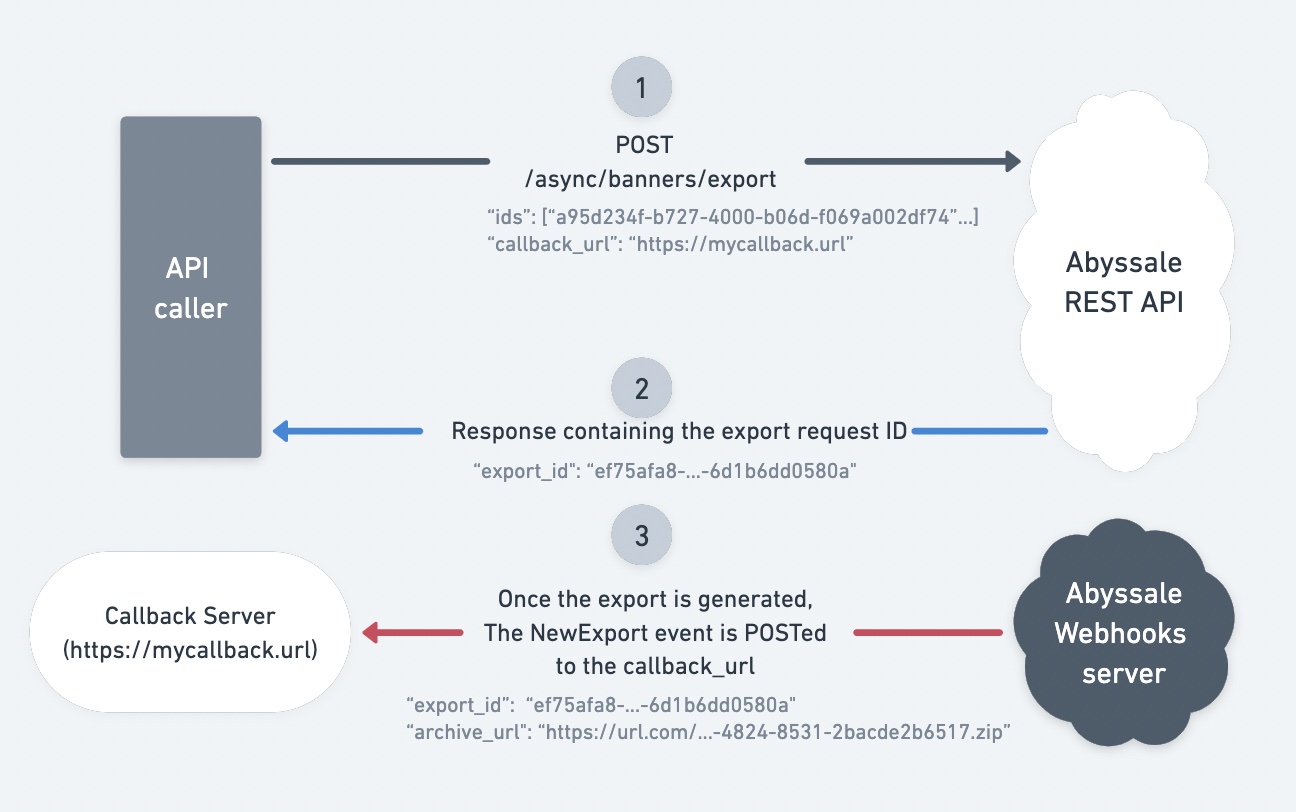
Generate a ZIP archive containing previously generated assets — any output type Abyssale produces (JPEG, PNG, WEBP, AVIF, PDF, MP4, GIF, HTML5 bundle).
Via the API the delivery is always a ZIP archive, whether you export one asset or many. (Single-file delivery — the asset under its own extension — is a platform-UI export behavior only.)
A callback URL is required in practice
Exports are asynchronous and there is no polling endpoint — without a callback_url you have no way to retrieve the result.
Banner IDs are returned by the synchronous generation and asynchronous generation endpoints.
Step 1 — Request an Export
Request body
| Field | Type | Required | Description |
|---|---|---|---|
ids | array | Yes | Array of generated-asset IDs (UUIDs, a.k.a. banner IDs) to include in the ZIP archive — any mix of output types. |
callback_url | string (uri) | Strongly recommended | URL that will receive a POST request when the export is ready. There is no polling endpoint for exports — if omitted, you will have no way to retrieve the export result. |
Response
| Field | Type | Description |
|---|---|---|
export_id | string (uuid) | Unique identifier of the export job. Use this to match the incoming webhook. |
Request example
curl -X POST \
  -H "x-api-key: {YOUR-API-KEY}" \
  -H "Content-Type: application/json" \
  -d '{
    "ids": [
      "64238d01-d402-474b-8c2d-fbc957e9d290",
      "7b349e12-e513-585c-9d3e-acd068f0ae40"
    ],
    "callback_url": "https://your-webhook.com/export-abyssale"
  }' \
https://api.abyssale.com/async/banners/exportimport abyssale from '@abyssale/sdk';
// Set ABYSSALE_API_KEY env var before running
const { data, error } = await abyssale.exportBanners({
ids: [
'64238d01-d402-474b-8c2d-fbc957e9d290',
'7b349e12-e513-585c-9d3e-acd068f0ae40',
],
callback_url: 'https://your-webhook.com/export-abyssale',
});
if (error) console.error(error);
else console.log(data.export_id);from abyssale import Abyssale
# Set ABYSSALE_API_KEY env var before running
with Abyssale() as client:
export = client.export_banners({
"ids": [
"64238d01-d402-474b-8c2d-fbc957e9d290",
"7b349e12-e513-585c-9d3e-acd068f0ae40",
],
"callback_url": "https://your-webhook.com/export-abyssale",
})
print(export.export_id)Step 2 — Receive the Export ID
If the request is accepted, the API returns an export_id identifying the asynchronous export job.
Possible errors:
400— Invalid parameter.404—endpoint_not_found: a banner ID that is not a valid UUID.404—visual_not_found: none of the given banner IDs exist in this workspace. A mix of known and unknown ids succeeds, and the export silently contains only the ones that were found — check the archive against what you asked for.
Step 3 — Receive the NEW_EXPORT Event
Once the export is ready, Abyssale sends a NEW_EXPORT webhook event (POST) to the callback_url you specified.
The event is always sent
If the initial request returns an export ID, the NEW_EXPORT event will always be sent — even if some assets failed.
See Global Events for the full payload structure.
Related
- Global Events — the
NEW_EXPORTpayload - Overview — Webhooks — what your endpoint must do
- Node.js SDK · Python SDK — every method, config, retries and the polling helpers