
Quickstart
Four calls, start to finish: prove your key works, find a design, render an image, open the URL. Everything here uses a design you already built in the Abyssale editor — creating one from JSON is a separate journey, linked at the bottom.
| Base URL | https://api.abyssale.com |
| Auth | x-api-key: {YOUR-API-KEY} on every request |
| You need | A workspace with at least one static design |
No design yet? Use the one on this page
The images below come from the Fitness ad set example — a free, importable payload. Download fitness-ad-set.json, set target.project_uuid, and POST it to /designs/import/json: a minute later you have the same design and every snippet here works unchanged.
Every snippet below reads your key from the environment, so set it once:
export ABYSSALE_API_KEY="{YOUR-API-KEY}"npm install @abyssale/sdk
export ABYSSALE_API_KEY="{YOUR-API-KEY}"pip install abyssale
export ABYSSALE_API_KEY="{YOUR-API-KEY}"Get your API key
In app.abyssale.com → Workspace settings → API key → Create new API key. The key appears after ~30 seconds; copy it with the icon on the right. Reading it requires an Admin role — full walkthrough with screenshots on Authentication.
Check the key works
Paste the key here and the page runs the call for you — or run it yourself below:
curl -X POST -H "x-api-key: $ABYSSALE_API_KEY" https://api.abyssale.com/auth
# {"company":"Acme Inc."}import abyssale from '@abyssale/sdk';
const { data, error } = await abyssale.verifyApiKey();
if (error) console.error(error);
else console.log(data.company); // Acme Inc.from abyssale import Abyssale
client = Abyssale() # reads ABYSSALE_API_KEY
print(client.verify_api_key().company) # Acme Inc.A 200 returns your workspace name — useful when you hold several keys and need to know which one you're testing. Anything wrong with the key answers 401; the two cases (unauthorized vs api_access_denied) are on Authentication.
Get a design ID
curl -H "x-api-key: $ABYSSALE_API_KEY" \
"https://api.abyssale.com/designs?type=static"const { data } = await abyssale.listDesigns({ type: 'static' });
console.log(data.map((d) => `${d.id} ${d.name}`).join('\n'));for design in client.list_designs(type="static"):
print(design.id, design.name)[
{
"id": "64238d01-d402-474b-8c2d-fbc957e9d290",
"name": "Fitness ad set",
"type": "static",
"project_id": "9d1f2b7c-5a44-4c3e-9f21-0b8e6d4a1c73",
"project_name": "Examples",
"preview_url": "https://production-banners.s3-eu-west-1.amazonaws.com/templates/…/a9b3c668.png"
}
]TIP
Know roughly what it's called? Search instead of listing: ?query=fitness matches the words in the design or the project name, sort=updated puts the latest edit first, and orientation=portrait keeps designs that have a story-shaped format. See List Designs.
Save one id — the next steps use it:
export DESIGN_ID="64238d01-d402-474b-8c2d-fbc957e9d290"Empty array?
The API only sees designs whose project is on your Projects page. A design at the workspace root is a workspace template and is listed separately — you duplicate it into a project to generate from it.
Generate an image
You can render straight away, with no overrides — the design's saved content is used:
curl -X POST \
  -H "x-api-key: $ABYSSALE_API_KEY" \
  -H "Content-Type: application/json" \
  -d '{}' \
"https://api.abyssale.com/banner-builder/$DESIGN_ID/generate"const { data, error } = await abyssale.generateImage(process.env.DESIGN_ID, {});
if (error) console.error(error);
else console.log(data.file.cdn_url);import os
banner = client.generate_image(os.environ["DESIGN_ID"], {})
print(banner.file.cdn_url){
"id": "5978e8d9-ab34-4735-a2cb-fe95c2c56251",
"file": {
"type": "jpeg",
"cdn_url": "https://cdn.abyssale.com/e0d292f2-…/996739f4-….jpeg",
"filename": "996739f4-b563-428a-a6e8-dd3cb8bd03d4.jpeg"
},
"format": { "id": "linkedin-square", "width": 1200, "height": 1200, "unit": "px" }
}Open file.cdn_url in a browser. That's your first generated asset — the design exactly as it was saved, in its first format:
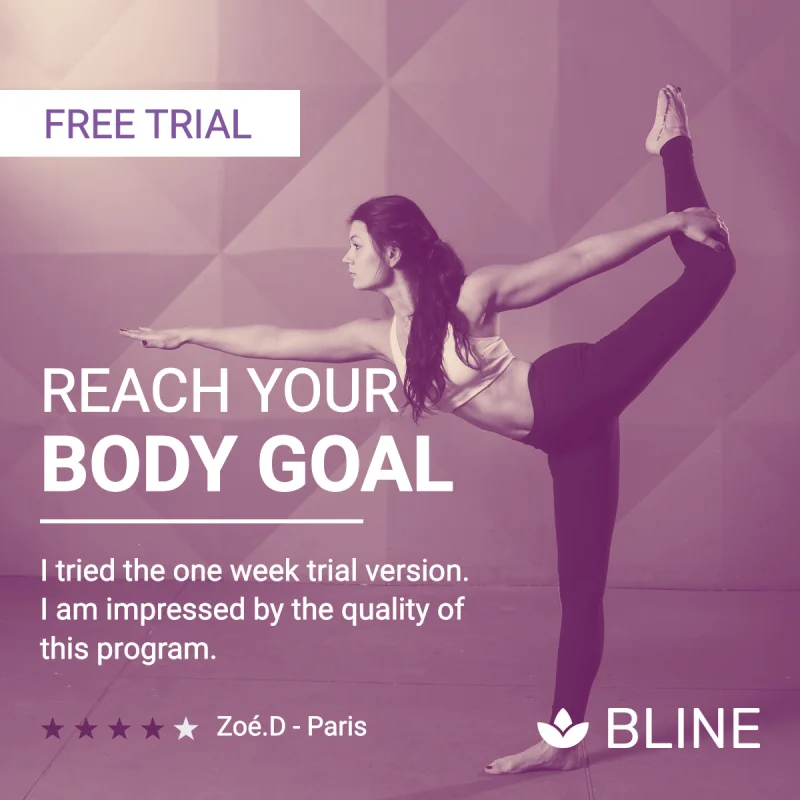
linkedin-square · 1200×1200 · jpeg · as designedChange something
Overrides go in elements, keyed by layer name. To learn the names your design uses, read it back — the response lists every format and every element with its current values (see Design Information):
curl -H "x-api-key: $ABYSSALE_API_KEY" \
"https://api.abyssale.com/designs/$DESIGN_ID"const { data } = await abyssale.getDesign(process.env.DESIGN_ID);
console.log(data.elements.map((e) => `${e.name} (${e.type})`).join('\n'));design = client.get_design(os.environ["DESIGN_ID"])
for element in design.elements:
print(element.name, element.type){
"id": "64238d01-d402-474b-8c2d-fbc957e9d290",
"name": "Fitness ad set",
"type": "static",
"formats": [ { "id": "linkedin-square", "width": 1200, "height": 1200, "unit": "px" }, … ],
"elements": [
{ "name": "image_bg", "type": "image",
"attributes": [ { "id": "image_url", "values": { "linkedin-square": "https://…/yoga.webp", … } }, … ] },
{ "name": "text_1", "type": "text",
"attributes": [ { "id": "payload", "values": { "linkedin-square": "REACH YOUR", … } }, … ] },
{ "name": "text_2", "type": "text",
"attributes": [ { "id": "payload", "values": { "linkedin-square": "BODY GOAL", … } }, … ] },
{ "name": "button_title", "type": "button", … },
{ "name": "text_notice", "type": "text", … },
{ "name": "rating", "type": "rating", … },
{ "name": "text_rating", "type": "text", … },
{ "name": "logo", "type": "logo", … },
{ "name": "shape", "type": "shape", … }
]
}Each element's name is the key you override. Its attributes[] list the properties you can set, with the current value per format.
Then override the ones you want — here the photo, the two headline lines, the badge, the testimonial and the score:
curl -X POST \
  -H "x-api-key: $ABYSSALE_API_KEY" \
  -H "Content-Type: application/json" \
  -d '{
    "template_format_name": "linkedin-square",
    "elements": {
      "image_bg": { "image_url": "https://example.com/pool.jpg", "fitting_type": "cover" },
      "text_1": { "payload": "FIND YOUR" },
      "text_2": { "payload": "MORNING FLOW" },
      "button_title": { "payload": "NEW CLASS" },
      "text_notice": { "payload": "Sunrise yoga, every weekday at 7am. First session is on us." },
      "rating": { "rating_score": 100 },
      "text_rating": { "payload": "Mia.K - Lyon" }
    }
  }' \
"https://api.abyssale.com/banner-builder/$DESIGN_ID/generate"const { data } = await abyssale.generateImage(process.env.DESIGN_ID, {
template_format_name: 'linkedin-square',
elements: {
image_bg: { image_url: 'https://example.com/pool.jpg', fitting_type: 'cover' },
text_1: { payload: 'FIND YOUR' },
text_2: { payload: 'MORNING FLOW' },
button_title: { payload: 'NEW CLASS' },
text_notice: { payload: 'Sunrise yoga, every weekday at 7am. First session is on us.' },
rating: { rating_score: 100 },
text_rating: { payload: 'Mia.K - Lyon' },
},
});
console.log(data.file.cdn_url);banner = client.generate_image(os.environ["DESIGN_ID"], {
"template_format_name": "linkedin-square",
"elements": {
"image_bg": {"image_url": "https://example.com/pool.jpg", "fitting_type": "cover"},
"text_1": {"payload": "FIND YOUR"},
"text_2": {"payload": "MORNING FLOW"},
"button_title": {"payload": "NEW CLASS"},
"text_notice": {"payload": "Sunrise yoga, every weekday at 7am. First session is on us."},
"rating": {"rating_score": 100},
"text_rating": {"payload": "Mia.K - Lyon"},
},
})
print(banner.file.cdn_url){}
Notice what you did not have to do: the new photo got the design's duotone filter, the headline kept its font and its white underline, the stars kept their colour. Only the values you named changed. Everything else is the design.
Two rules that catch everyone once:
- Every element value must be an object.
{"text_1": "Hi"}answers400 invalid_payload; write{"text_1": {"payload": "Hi"}}. template_format_nameis optional — omit it and the design's first format is rendered. Name another one and the same overrides lay themselves out for it:
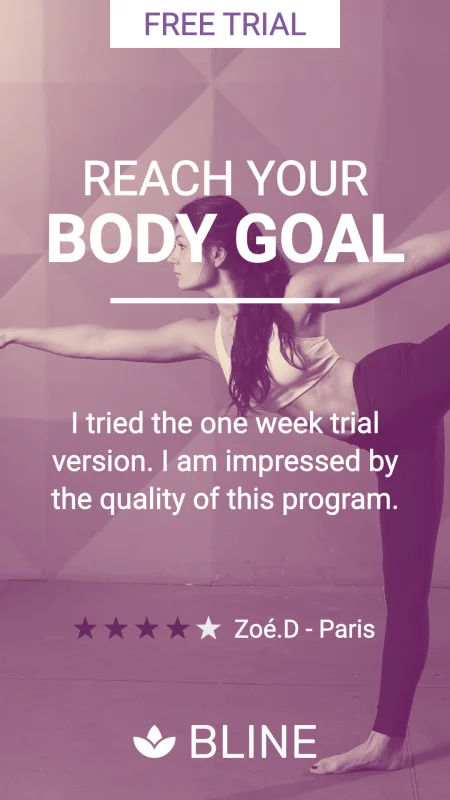
instagram-story 1080×1920
leaderboard 728×90Every overridable property, per layer type, is on Element Properties.
Done. You have a working key, a design ID, and two generated images: one as designed, one with your own text and photo.
When something fails
Every endpoint answers with the same envelope, at every status. Branch on id, never on the message text:
{ "id": "template_not_found", "message": "Design not found" }| Status | Likely id | Meaning |
|---|---|---|
400 | invalid_payload | Field-level detail is in errors[] |
401 | unauthorized | Key unknown, revoked, or missing |
404 | template_not_found | Wrong design ID, or its project isn't yours |
429 | rate_limit_exceeded | Out of credits, or the 10 requests per second ceiling |
429 | request_rate_limited | Too fast for this route's budget — see Rate limits |
Full list: Errors.
Where to go next
- More than one image per call — Asynchronous Generation renders every format and every output type (video, GIF, HTML5, print PDF) in one request, and delivers results by webhook.
- Create designs from JSON — Design Import builds a design from a single payload, no editor involved.
- No API call per image — Dynamic Images mints one public URL whose query string is the personalization.
- The whole model — Overview explains projects, designs, formats, layers and visuals, and links to every reference page.
- Staying in your language — the Node.js SDK and Python SDK references list every method, the environment variables they read, and the polling helpers that replace a hand-written wait loop.